
Using Ledger with DeFi: A Complete Guide starts with understanding how hardware security improves your access to decentralized finance. Ledger devices let you sign transactions offline, keeping private keys away from internet threats. This method protects assets while you use lending platforms, exchanges, or liquidity pools. For anyone exploring Web3 finance, combining a hardware wallet with DeFi protocols offers a stronger safety layer than software-only solutions.
Managing digital assets in decentralized finance requires careful attention to private key storage. Online wallets and browser extensions expose funds to malware and phishing attacks. Ledger hardware wallets solve this issue by keeping keys inside a secure chip. When you connect your device to a DeFi app, all transaction approvals happen physically on the device. Offline key storage reduces risk for both small holders and large investors.
What makes Ledger different from hot wallets for DeFi users
Choosing between a hardware wallet and a hot wallet depends on your risk tolerance. Hot wallets remain connected to the internet, which makes them convenient but vulnerable. Ledger devices store keys offline, requiring physical confirmation for every transaction. This difference matters when you interact with smart contracts or approve token allowances on DeFi platforms. Understanding the security gap helps you decide which tool fits your trading habits and asset value.
Key differences between hardware and software wallets
- Private keys stay offline on Ledger, never exposed to the internet
- Hot wallets like MetaMask store keys in browser memory, prone to malware
- Ledger requires button confirmation for each transaction, blocking remote access
- Software wallets offer faster login but higher risk of unauthorized transfers
- Recovery phrases on Ledger are generated offline, reducing exposure during setup
Why DeFi protocols attract both users and attackers
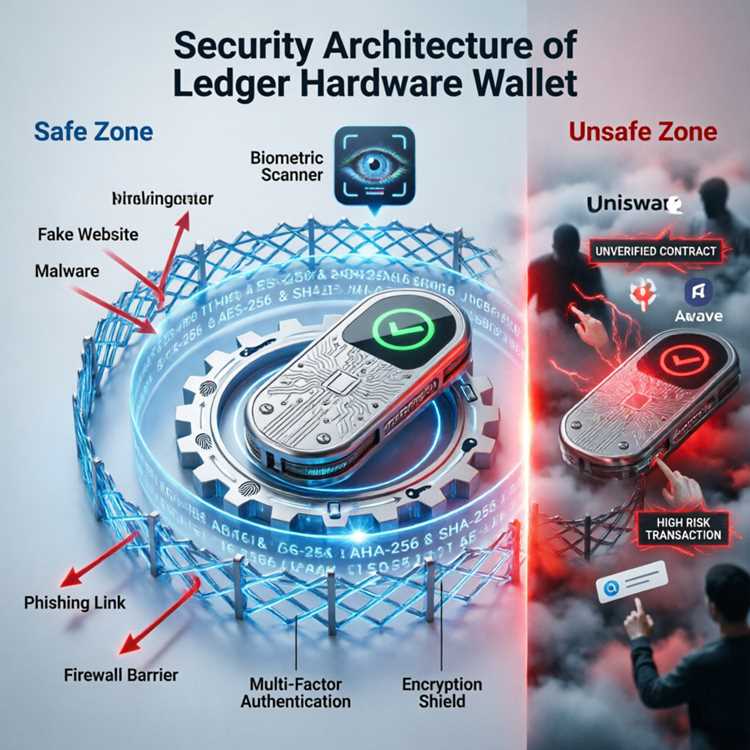
Decentralized finance platforms hold billions in locked value, making them prime targets. Hackers exploit smart contract bugs, phishing sites, and fake apps to drain funds. Using a ledger device adds a hardware barrier that even compromised websites cannot bypass. Attackers need physical access to your device and PIN to authorize transactions. This protection makes DeFi with Ledger significantly safer than relying solely on browser wallets.
Common threats that hardware wallets prevent
- Phishing sites tricking users into connecting fake wallets
- Malware capturing browser extension seed phrases
- Clipboard hijackers modifying pasted addresses
- Fake dApps requesting unlimited token allowances
- Remote key extraction from hot wallet storage
Setting up Ledger MetaMask integration correctly
Connecting your hardware wallet to MetaMask requires a few steps but delivers major security gains. Ledger MetaMask integration allows you to use Ethereum-based DeFi platforms while keeping keys offline. This setup works with the Ledger Live app and the MetaMask browser extension. Following the correct process prevents errors like selecting the wrong derivation path or missing firmware updates.
Step by step guide to connect Ledger with MetaMask
- Install Ledger Live on your computer and update the device firmware
- Open MetaMask, click the account icon, and select Connect Hardware Wallet
- Choose Ledger from the list and click Continue
- Unlock your Ledger device and open the Ethereum app
- Select the account you want to connect from the derivation path options
- Confirm the connection on your Ledger device by pressing both buttons
- Verify the address matches between MetaMask and your Ledger screen
Common setup mistakes to avoid during connection
Many users forget to enable blind signing in the Ethereum app settings. Blind signing allows you to approve transactions from decentralized exchanges and lending protocols. Without this setting, DeFi apps cannot read transaction data sent to your device. Another frequent error involves using the wrong USB cable or port, causing connection drops. Check Ledger help if you experience persistent disconnection issues during setup.
Verifying addresses and signing transactions safely
Always confirm addresses on your Ledger screen before sending funds. Software wallets can show fake addresses if compromised. When you sign a transaction, the device displays the amount and destination. Reject any transaction that looks different from what you intended. This practice helps you avoid Ledger loss from approving malicious smart contract calls.
Managing DeFi transactions with Ledger Live
Using Ledger for DeFi operations does not always require MetaMask. Ledger Live now supports direct interactions with select protocols for swapping and lending. This built-in functionality simplifies the user experience while maintaining the same hardware security. Managing DeFi with Ledger through the official app reduces exposure to third-party extensions and fake dApps.
Supported DeFi features inside Ledger Live
- Token swaps through integrated exchange partners
- Lending and borrowing via supported protocols
- Ledger staking rewards for proof of stake assets
- Transaction history tracking for connected accounts
- Portfolio overview across multiple blockchains
Limitations of Ledger Live for advanced DeFi users
Some complex DeFi strategies require direct smart contract interaction not available in Ledger Live. Users who want to provide liquidity, yield farm, or use leverage must connect through MetaMask or other Web3 wallets. Ledger Live shows basic market data but lacks tools for analyzing pool risks or impermanent loss. For advanced operations, rely on the MetaMask connection method described earlier.
When to use MetaMask instead of Ledger Live
Choosing MetaMask makes sense when you need to approve custom smart contracts or access newer DeFi protocols. Ledger Live supports only vetted partners, limiting your options for early stage projects. However, using MetaMask with your Ledger device still keeps keys offline. You gain the flexibility of browser wallets without sacrificing hardware security.
Understanding Ledger DeFi security features
Security in DeFi depends on how you manage permissions and approve transactions. Ledger DeFi security relies on the Secure Element chip, which isolates private keys from the operating system. This chip has certifications for resisting physical and logical attacks. Understanding these features helps you trust the device when interacting with unfamiliar protocols.
How the Secure Element protects private keys
The chip stores keys in a tamper resistant environment separated from the device firmware. Even if malware infects your computer, the chip never exposes the private key. All transaction signatures happen within the chip, and the result is sent to the computer for broadcast. This design prevents key extraction even if an attacker gains remote access to your system.
Transaction approval flow on Ledger devices
- Your computer sends unsigned transaction data to the Ledger device
- The device displays the transaction details on its screen
- You confirm or reject by pressing the physical buttons
- The chip signs the transaction using the private key
- Signed transaction is sent back to the computer for broadcast
Risks that remain even with a hardware wallet
Hardware wallets protect against remote attacks but not against user error. Signing a malicious smart contract can drain your tokens even if the device is secure. Always read the transaction details displayed on your Ledger screen. Never approve transactions that request unlimited token spending or unusual amounts. Reviewing smart contract addresses on block explorers adds an extra verification step.
Choosing the right Ledger model for DeFi activities
Different Ledger models offer varying screen sizes, battery life, and connectivity options. For DeFi users, screen size matters because you need to read transaction details clearly. Battery life affects how easily you can approve transactions without being tethered to a computer. Comparing models helps you pick the device that matches your trading frequency and mobility needs.
Ledger Nano S Plus vs Nano X for DeFi use
| Feature | Nano S Plus | Nano X |
|---|---|---|
| Screen size | 128 x 64 pixels | 128 x 64 pixels |
| Connectivity | USB C only | USB C and Bluetooth |
| Battery | No battery | 8 hours of use |
| App capacity | Up to 100 apps | Up to 100 apps |
| Price | $79 | $149 |
| Best for | Desktop trading | Mobile and desktop trading |
Ledger wallet comparison shows that both models support the same DeFi protocols. The Nano X adds Bluetooth for wireless connections to mobile phones. If you trade on the go, the Nano X offers convenience. For stationary use at home, the Nano S Plus saves money without losing security.
Price and compatibility considerations
Both models work with MetaMask, Ledger Live, and most Web3 wallets. The Nano X costs nearly double but includes Bluetooth and a battery. Consider your setup before choosing. Users who prefer desktop only can choose the cheaper model. Mobile DeFi users benefit from the wireless connection of the Nano X.
Staking and earning rewards securely with Ledger
Proof of stake networks let you earn rewards by locking tokens to support network security. Ledger staking rewards come from delegating assets directly from your hardware wallet. This process keeps your tokens under your control while generating passive income. Several major blockchains support staking through Ledger Live or third party wallets.
Supported staking assets on Ledger
- Ethereum
- Cardano
- Polkadot
- Solana
- Tezos
- Cosmos
How staking works without giving up custody
When you stake through Ledger, your tokens remain in your wallet but are delegated to a validator. The validator processes transactions and shares rewards with delegators. You can withdraw or switch validators at any time during the unbonding period. This method differs from centralized staking where the platform holds your tokens. Using a hardware wallet ensures you maintain full ownership of your assets.
Risks associated with staking protocols
Staking involves lock up periods during which you cannot access your tokens. Validator misbehavior can cause slashing, where a portion of staked funds is lost. Choose validators with strong track records and lower commission rates. Always understand the unbonding time before committing tokens to a staking pool.
Comparing Ledger with other DeFi wallet options
Alternatives to Ledger include Trezor, Keystone, and software wallets like MetaMask. Each option offers different trade offs between security, price, and ease of use. Comparing features helps you decide which wallet matches your DeFi activities. The right choice depends on your asset value, technical skill, and how often you trade.
| Wallet type | Price range | Key security feature | Best for |
|---|---|---|---|
| Ledger Nano X | $149 | Secure Element chip | Large holdings and frequent use |
| Ledger Nano S Plus | $79 | Secure Element chip | Budget conscious users |
| Trezor Model T | $219 | Open source firmware | Privacy focused users |
| Keystone Pro | $168 | Air gapped QR signing | Maximum isolation |
| MetaMask hot wallet | Free | No hardware security | Small balances and testing |
Looking at alternatives to Ledger reveals that hardware wallets generally cost between $79 and $219. Ledger offers the best price to security ratio for most DeFi users. The Secure Element chip provides bank grade protection not found in cheaper competitors. For users holding significant value, the extra cost of a hardware wallet pays for itself through reduced risk.
Recovering access after losing a device
Losing your Ledger device does not mean losing your funds. Your Ledger recovery phrase allows you to restore assets on a new device. This phrase must be kept offline and never typed into a computer or phone. Understanding the recovery process prepares you for worst case scenarios.
Steps to recover funds on a new device
- Purchase a new Ledger device from the official store
- Initialize the device and select Restore from Recovery
- Enter your 24 word recovery phrase using the device buttons
- Reinstall apps for each blockchain containing tokens
- Use MetaMask or Ledger Live to access your original addresses
Storing the recovery phrase securely
Write the phrase on the card provided with your device. Store it in a fireproof safe or safety deposit box. Never take a photo or save it in cloud storage. Multiple copies in separate locations add protection against theft or natural disasters. The recovery phrase is the single point of failure for your entire portfolio.
Frequently asked questions about using Ledger with DeFi

Many new users ask similar questions about hardware wallet compatibility and safety. Below are common concerns and factual answers based on current protocol requirements.
Can I use Ledger with any DeFi protocol?
Ledger works with any Ethereum compatible protocol through MetaMask. For non Ethereum blockchains, check if Ledger Live supports direct integration. Most major DeFi platforms on Solana, Polygon, and Binance Smart Chain allow hardware wallet connections. Always verify compatibility on the protocol documentation page.
Do I need internet on my Ledger device?
No. Ledger devices do not connect to the internet directly. They sign transactions received from your computer or phone. The signed transaction is then broadcast by the connected software wallet. This offline signing is the core security advantage of hardware wallets.
What happens if my Ledger breaks while tokens are staked?
Your tokens remain on the blockchain, not inside the device. Purchase a new Ledger or use any BIP39 compatible wallet to restore access. Import your recovery phrase into the new device and regain full control. Staking rewards continue to accumulate and become available after unbonding.
How do I avoid fake dApps when using DeFi with Ledger?
Bookmark official protocol websites and always double check URLs before connecting. Use blockchain explorers to verify smart contract addresses. Never click links from social media posts or direct messages. Fake dApps can request approvals that drain your wallet instantly.
Can I use Ledger with a mobile phone for DeFi trades?
Yes. Ledger Nano X supports Bluetooth connections to the Ledger Live mobile app. You can also connect via USB OTG cable with Android devices. Mobile trading offers convenience but requires careful attention to network security. Avoid using public WiFi when signing transactions.